
Quick Answer
Smart glasses are most useful when a buyer starts with a specific application, such as hands-free video capture, audio, translation support or field communication, then validates comfort, battery behavior, privacy controls and companion-app compatibility with a sample.
Buyer FAQ
What should B2B buyers test before sourcing smart glasses?
Test wearing comfort, video and audio quality, charging, battery behavior, Bluetooth pairing, app permissions, language support, packaging and the consistency of multiple samples.
Are smart glasses suitable for private-label projects?
They can be suitable when branding, packaging, manuals, accessories and applicable documentation are planned around the exact hardware and target market.
Source Notes
For products with wireless functions, buyers should review the FCC equipment authorization guidance and confirm market-specific requirements for the final configuration.
Smart glasses have finally moved beyond the “cool but impractical” stage. In 2026, the best models pair a familiar eyewear design with hands-free cameras, open-ear audio, voice-controlled AI, and useful travel features. They are not a replacement for your smartphone—but for the right person, they can make everyday technology feel much more natural.
So, are smart glasses worth buying in 2026? Here is what they can genuinely do, where they still fall short, and who should consider adding a pair to their everyday carry.
What Are Smart Glasses?
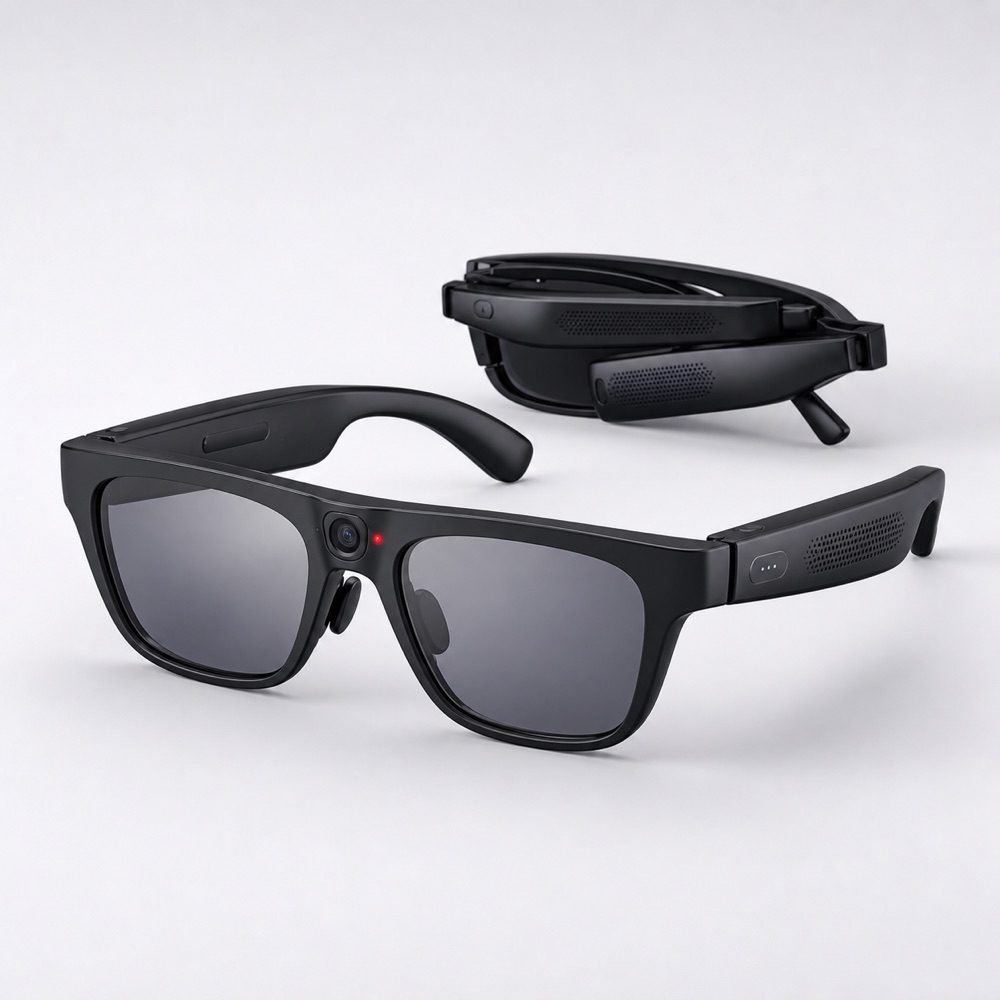
Smart glasses are wearable devices designed to look and feel like ordinary glasses or sunglasses. Depending on the model, they may include cameras, microphones, speakers, touch controls, voice assistants, and sometimes a small display.
Most popular consumer models do not place a full digital screen in front of your eyes. Instead, they focus on practical tasks that are easier when your hands are busy:
- Taking photos and short videos without holding a phone
- Making calls and listening to music or podcasts
- Using an AI assistant through voice commands
- Sending messages hands-free
- Translating text or conversations
- Getting quick directions and information
The appeal is simple: the best smart glasses let you stay present in the real world while reaching for your phone a little less often.
What Smart Glasses Do Well
1. Capture moments without pulling out your phone
This is one of the most convincing reasons to own smart glasses. A built-in camera makes it easy to capture a first-person photo or a short video while walking the dog, traveling, cooking, cycling, or spending time with family.
The advantage is not only convenience—it is spontaneity. Instead of unlocking your phone, opening the camera, and holding it up, you can use a voice command or a physical button. That makes the technology especially attractive to travelers, parents, and creators who want more natural behind-the-scenes footage.
2. Calls, music, and podcasts with open-ear audio
Many smart glasses include small speakers in the arms of the frame. Unlike traditional earbuds, open-ear audio allows you to hear your surroundings while listening to a call, a podcast, or turn-by-turn directions.
That is helpful for commuting, walking, running errands, cooking, and moving through an airport. You can take a call or follow navigation without completely disconnecting from the people and sounds around you.
Audio quality has improved considerably, but smart glasses are not meant to replace high-end noise-canceling headphones. In a busy train station or a loud gym, earbuds or over-ear headphones will still offer a more immersive listening experience.
3. Voice AI feels more useful on glasses
AI is where smart glasses begin to feel genuinely different from a smartwatch or a pair of wireless earbuds. You can ask questions naturally while doing something else: “What is this building?”, “Translate this menu,” “Remind me to call Sarah later,” or “How do I make this recipe?”
On supported models, the camera can give an AI assistant context about what you are seeing. That can be useful for identifying an object, interpreting a sign, getting quick travel help, or finding information without stopping to type on a screen.
It is still important to treat AI answers as a starting point rather than unquestionable fact, especially for health, legal, financial, or safety decisions. But for everyday questions, it can be an impressively convenient hands-free tool.
4. Travel is one of the best use cases
Smart glasses make a lot of sense for frequent travelers. They can help you take photos, listen to directions, answer calls, translate simple text, and access an assistant while your hands are occupied by luggage, tickets, or a coffee.
They are particularly useful in situations where repeatedly taking out a phone is inconvenient: finding the right platform, navigating an unfamiliar neighborhood, reading a menu, or capturing a view before the moment passes.
Where Smart Glasses Still Fall Short
Battery life remains limited
There is only so much battery that can fit inside a lightweight pair of glasses. Most models are designed for occasional use throughout the day, not for constant video recording, all-day audio, or long AI conversations.
A charging case can extend practical use, but you should keep realistic expectations. If you want to record a full concert, listen to music for an entire workday, or use navigation for several hours, your phone and headphones will still be important companions.
They are not a smartphone replacement
Smart glasses are best thought of as a companion device. They can make small tasks faster, more natural, and more hands-free, but they are not ideal for reading long emails, editing documents, browsing complex websites, or watching full-length video.
Your phone remains the main screen. The glasses simply reduce the number of moments when you need to take it out.
Privacy matters
A camera built into eyewear naturally raises privacy concerns. Responsible products include a visible recording indicator, but people around you may not always notice or understand it.
Good smart-glasses etiquette is straightforward: tell people when you are recording, respect rules at events and workplaces, and never film in private or sensitive spaces without clear permission. Avoid recording strangers simply because the camera is convenient.
Features may vary by country and phone
AI functions, translation tools, messaging integrations, and voice commands may differ by region, language, operating system, and local regulations. Before buying, check exactly which features are available in your country and how well the glasses work with your iPhone or Android device.
Who Should Buy Smart Glasses?
Smart glasses are worth considering if you are a frequent traveler, a casual content creator, a commuter, or someone who likes having voice AI available without constantly checking a screen. They can also be a good fit for people who take a lot of calls while walking, cooking, or working around the house.
They may be less appealing if you need all-day battery life, prefer private audio, rarely use voice assistants, or feel uncomfortable wearing a camera in public. If your main goal is a large augmented-reality display, it is worth researching carefully—many mainstream smart glasses still prioritize cameras, audio, and AI over visual overlays.
What to Look For Before You Buy
Start with the frame. A smart feature is not very useful if the glasses are uncomfortable or do not suit your style. Check the weight, fit, lens options, and whether prescription lenses are available.
Next, look at real camera samples and independent reviews. Specs alone rarely tell you how a camera performs in low light, how clearly microphones pick up your voice, or whether open-ear audio is loud enough for your routine.
Finally, compare battery life against the way you expect to use the glasses. Occasional photos and calls have very different demands from daily video creation or long listening sessions.
Final Verdict: Are Smart Glasses Worth It?
For the right person, yes. Smart glasses are worth buying in 2026 if you want an easier, more hands-free way to capture photos, make calls, listen to audio, and use AI while you move through the day.
They are especially compelling for travel, commuting, active lifestyles, and casual content creation. But they are still an optional accessory, not an essential replacement for the smartphone. Limited battery life, uneven AI availability, and legitimate privacy concerns mean they work best when you understand both their strengths and their boundaries.
The best smart glasses do not try to pull you out of the world. They make the moments when reaching for your phone feels inconvenient a little easier.
Frequently Asked Questions
Can smart glasses record video?
Yes. Many consumer smart glasses include a small camera for photos and short first-person videos. Recording quality and maximum length vary by model.
Do smart glasses have a screen?
Some models include a display, but many popular smart glasses do not. They focus on cameras, speakers, microphones, and voice AI instead.
Can smart glasses replace headphones?
For casual calls, podcasts, and music, they can be a convenient alternative. They usually cannot match the isolation or deep sound of premium headphones in noisy environments.
Are smart glasses legal?
In most places, owning smart glasses is legal. Recording laws and venue rules vary, so always respect local law and get permission when appropriate.
Can I get smart glasses with prescription lenses?
Many models offer prescription, clear, sunglass, and transition lens options. Confirm compatibility with the specific frame and your prescription before ordering.
